RealTime Chatting App Project
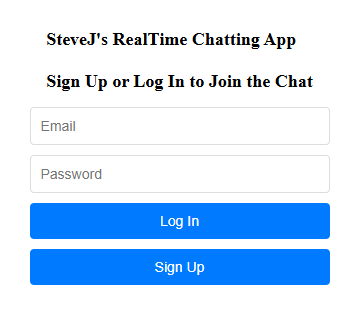

This is just a screenshot. Click the button in the bottom of the page for actual demo
Overview
This is a real-time group chat web application built with React for the frontend and Firebase for backend services (authentication and real-time database). It allows users to sign up, log in, and participate in a live chat room, with messages instantly updating for all users. The app also features emoji support and a clean, modern UI.
Key features:
User can create an account or log in with email and password.
Auth. is handled by Firebase Authentication.
The app tracks the current user and updates the UI accordingly (shows chat if logged in, auth form if not).
Users can log out, which immediately updates the UI and removes access to the chat.
All chat messages are stored in Firebase's real-time database.
Messages are instantly synced and displayed for all users as soon as they are sent.
Each message includes the sender’s email and the message text.
Modern, Responsive Design:
Styled with CSS for a clean, user-friendly experience.
Chat Layout:
Messages are displayed in a scrollable area, with sender and message text clearly shown.
Message Input:
Users can type messages and send them with a button.
Emoji Picker:
Users can add emojis to their messages using an emoji picker component.
Component Structure
App.jsx:
Main component, handles authentication state, message fetching, sending, and UI logic.
Auth.jsx:
Handles sign up and log in forms, error display, and calls Firebase Auth methods.
firebase.js:
Initializes Firebase app, exports database and auth instances for use in other components.
App.css:
Contains all the styles for the chat and auth UI.
index.jsx / index.html:
Standard React entry point, renders the App component into the root div.
User visits the app, if not logged in, sees the Auth form. If logged in, sees the chat interface. Without logging in, user is not able to use the chatting interface.
When user signs up or logs in, the Auth state updates, user info is sorted in Firebase Auth. Then user sends a message which is pushed to Firebase Realtime Database. Then all users logged in receives the message at the same time.
When use logs out, the Auth state resets, chat is hidden again, and Auth form (Sign up or Log in) shows up.
Programming Languages / Libraries / Frameworks / Databases Used
Frontend: React
Backend/Database: Firebase Realtime Database
Authentication: Firebase Auth
Emoji Picker: emoji-mart
Styling: CSS (App.css)
How does it work (Workflow)?
This project is made of three main parts:
Auth (controlling the access),
Chat (main feature with users logged in),
Emoji (graphics makes messages more expressive)
The core idea of this project is to leverage React components and props to build a modular, interactive, and state-driven real-time chat application. This app is composed of reusable components. App.jsx is the main component which manages authentication state, message state, and renders chat or auth form. Auth.jsx handles the authentication UI and logic. This is a minimum but clear separation.
Entry point
index.jsx is the main entry point of the project. The file is the starting point of the React application which:
imports React and ReactDOM.
imports the App component.
Renders the App component into the HTML element with id root (which is defined in index.html).
index.jsx is loaded by the browser (via <script src="/src/index.jsx"> in index.html).
import React from 'react'
import ReactDOM from 'react-dom/client'
import App from './App'
ReactDOM.createRoot(document.getElementById('root')).render(
<React.StrictMode>
<App />
</React.StrictMode>
)
Imports the main React library.
This is required for using JSX (the <App /> syntax) and React features.
Imports the ReactDOM library, specifically the new "root" API (introduced in React 18).
This is used to render your React app into the DOM (the HTML page).
Finds the HTML element with the id root (from your index.html file: <div id="root"></div>).
Creates a React "root" for rendering your app (using the new concurrent features in React 18+).
Prepares to render your React component tree inside this root element.
*<React.StrictMode> is a special wrapper that helps you find potential problems in your app (like deprecated APIs, side effects, etc.) during development. It does not affect production builds.
*This file connects HTML page and React. <div id="root"></div> in HTML should be taken over by React for displaying the entire app.
Main application
App.jsx is the main application component. This controls the chat app's logic and UI. It does:
Handles authentication state (shows login/signup if not logged in, chat UI if logged in).
Listens for real-time chat messages from Firebase.
Handles sending messages, logging out, and emoji picking.
Imports and uses:
Auth (for login/signup UI)
Firebase services (db, auth) from firebase.js
CSS styles from App.css
import { useState, useEffect } from 'react';
-> imports useState and useEffect from React
It allows state being added to the component. useEffect allows the code run in response to component lifecycle events (component mounts, updates, or unmounts).
*What is React Component and How does it work?
import { ref, onValue, push } from "firebase/database"; -> This line imports functions to interact with Firebase Realtime. ref: creates a reference to a location in the database
onValue: listens for real-time updates at a database reference
push: adds a new item to a list in the database
import { onAuthStateChanged , signOut } from "firebase/auth";
Imports functions for authentication:
onAuthStateChanged: Listens for changes in the user’s authentication state (login/logout).
signOut: Signs the user out.
import { db, auth } from './firebase';
Imports your configured Firebase database (db) and authentication (auth) instances from your firebase.js file.
import './App.css';
import Auth from './Auth';
// Emoji picker imports
import Picker from '@emoji-mart/react';
import data from '@emoji-mart/data';
Imports the emoji picker UI component (Picker) and its emoji data (data) from the emoji-mart library.
This allows users to pick emojis to add to their chat messages.
export default function App() {
const [messages, setMessages] = useState([]);
const [newMessage, setNewMessage] = useState('');
const [user, setUser] = useState(null);
const [showPicker, setShowPicker] = useState(false); // For emoji picker
Starting point of main App component. The first line declares a React functional component 'App'.
Each of these lines creates a piece of state of the component (State is how React components keep track of changing data).
*message -> holds the list of chat message array
*setMessage -> function used to update the list
*ustState[ ]-> initializes it as an empty array
*newMessage->holds the current text user is typing in the input box
*setNewMessage->updates the text
*useState(' ')->initializes it as an empty string
*user ->holds the current logged-in user's information (or 'null' if not logged in)
*setUser->updates the user info
*useState(null) initializes it as 'null', which means no user is logged in
*showPicker-> is a boolean that determines whether the emoji picker is visible
*setShowPicker updates its value
*useState(false) initializes it as 'false' (Emoji is hidden by default)
*Why all the initial state starts with 'empty', or 'inactive'? Because that is before any user activity happens.
useEffect(() => {
const unsubscribe = onAuthStateChanged(auth, (currentUser) => {
setUser(currentUser);
if (!currentUser) setMessages([]);
});
return () => unsubscribe();
}, []);
useEffect(..., []) | Runs effect once on mount (and cleans up on unmount)
onAuthStateChanged | Listens for login/logout/auth changes
setUser(currentUser) | Updates app with the current user info
if (!currentUser) setMessages([]) | Clears messages if user logs out
return () => unsubscribe() | Cleans up the listener when component unmounts
so, it is a cleanup function. When the component unmounts (is removed from the page), it calls unsubscribe().
useEffect(() => {
if (user) {
const messagesRef = ref(db, 'messages');
const unsubscribe = onValue(messagesRef, (snapshot) => {
const data = snapshot.val() || {};
setMessages(Object.entries(data).map(([id, msg]) => ({ id, ...msg })));
// Scroll to bottom after messages update
const chatMessages = document.querySelector('.chat-messages');
if (chatMessages) {
chatMessages.scrollTop = chatMessages.scrollHeight;
}
});
return () => unsubscribe();
} else {
setMessages([]);
return () => {};
}
}, [user]);
This effect listens for real-time updates to chat messages only when a user is logged in.
If a user is logged in (if (user)):
Create a reference to the 'messages' node in your Firebase Realtime Database.
Set up a real-time listener (onValue) on that reference.
Every time the data changes:
Get the latest messages (snapshot.val()).
Convert the messages object into an array of message objects, each with an id.
Update the messages state with this array.
Scroll the chat window to the bottom so the newest message is visible.
Return a cleanup function to unsubscribe from updates when the component unmounts or the user changes.
If no user is logged in (else):
Clear the messages.
Return a dummy cleanup function. The effect runs every time the user changes (logs in or out).
const handleSubmit = (e) => {
e.preventDefault();
if (!newMessage.trim() || !user) return;
const messagesRef = ref(db, 'messages');
push(messagesRef, {
text: newMessage,
sender: user.email || 'Anonymous'
});
setNewMessage('');
};
This block is for: Handling sending a new chat message when the user submits the form.
Prevent the default form submission (so the page doesn’t reload).
If the message is empty or there’s no user, do nothing.
Create a reference to the 'messages' node in the database.
Add (push) a new message object with the text and sender’s email.
Clear the input box.
const handleLogout = async () => {
try {
await signOut(auth);
console.log('User signed out successfully.');
} catch (error) {
console.error('Error signing out:', error);
}
};
This block above is for: logging the user out of the app.
// Add emoji to message
const addEmoji = (emoji) => {
setNewMessage(newMessage + emoji.native);
};
if (!user) {
return <Auth />;
}
return (
<div className="chat-container">
<h2>Welcome, {user.email}!</h2>
<div className="chat-messages">
{messages.map(message => (
<div key={message.id} className="message">
<span className="sender">{message.sender}:</span>
<span className="text">{message.text}</span>
</div>
))}
</div>
<form onSubmit={handleSubmit} className="message-form">
<input
type="text"
value={newMessage}
onChange={(e) => setNewMessage(e.target.value)}
placeholder="Type a message..."
className="message-input"
disabled={!user}
/>
<button
type="button"
onClick={() => setShowPicker(!showPicker)}
className="send-button"
style={{ minWidth: 40 }}
>
😊
</button>
{showPicker && (
<div style={{ position: 'absolute', bottom: 70, right: 30, zIndex: 10 }}>
<Picker data={data} onEmojiSelect={addEmoji} />
</div>
)}
<button type="submit" className="send-button" disabled={!user}>Send</button>
<button type="button" onClick={handleLogout} className="logout-button">Log Out</button>
</form>
</div>
);
}
How does it integrate?
App.jsx is rendered by index.jsx.
Uses Auth.jsx for authentication UI.
Uses Firebase services from firebase.js for database and authentication.
Uses styles from App.css.
Authentication component
Auth.jsx handles user sign-up and login. The file provides:
forms for email/password login and signup.
Uses Firebase Auth methods (from firebase.js) to create or sign in users.
Error message if authentication fails.
How does it integrate?
When the user is not logged in, it is imported and used by App.jsx. It also uses the auth instance from firebase.js.

Emoji features
const addEmoji = (emoji) => {
setNewMessage(newMessage + emoji.native);
};
if (!user) {
return <Auth />;
}
return (
<div className="chat-container">
<h2>Welcome, {user.email}!</h2>
<div className="chat-messages">
{messages.map(message => (
<div key={message.id} className="message">
<span className="sender">{message.sender}:</span>
<span className="text">{message.text}</span>
</div>
))}
</div>
<form onSubmit={handleSubmit} className="message-form">
<input
type="text"
value={newMessage}
onChange={(e) => setNewMessage(e.target.value)}
placeholder="Type a message..."
className="message-input"
disabled={!user}
/>
<button
type="button"
onClick={() => setShowPicker(!showPicker)}
className="send-button"
style={{ minWidth: 40 }}
>
😊
</button>
{showPicker && (
<div style={{ position: 'absolute', bottom: 70, right: 30, zIndex: 10 }}>
<Picker data={data} onEmojiSelect={addEmoji} />
</div>
)}
How this snippet work?
const addEmoji = (emoji) => {
setNewMessage(newMessage + emoji.native);
}; -> This function is called when a user selects an emoji from the emoji picker (Graphic). It has a parameter (emoji) which is the object representing the selected emoji from the picker graphic. 'newMessage' state is updated by appending the selected emoji's native character.
<button
type="button"
onClick={() => setShowPicker(!showPicker)}
className="send-button"
style={{ minWidth: 40 }}
>
😊
</button>
This is a button action which toggles the 'showPicker' state between true and false.
<input
type="text"
value={newMessage}
onChange={(e) => setNewMessage(e.target.value)}
placeholder="Type a message..."
className="message-input"
disabled={!user}
/>
Now, this is the input field where user types in their message.
value={newMessage}: The input’s value is controlled by the newMessage state.
onChange={(e) => setNewMessage(e.target.value)}-> This updates newMessage as the user types.
Emoji Insertion: When an emoji is selected, addEmoji updates newMessage, so the emoji appears in the input.
Overall, when user clicks the emoji button, setShowPicker toggles, and the emoji picker appears (true/false). When addEmoji is called, it appends the emoji to the current message. When the emoji appears in the input, the user sends messages or continue to type.
What would be pros and cons (and possible future improvements)?
Pro1: For privacy and security, only users logged in (authenticated) can access the chat.
Pro2: Emoji feature support makes the chatting conversations more fun. Emoji UI is easy and well-integrated.
Pro3: UI is clean and straightforward with clear separation of messages, input, and controls.
Pro4: User can choose conditional rendering, which shows the picker only user need.
Pro5: Functional components and hooks (like useState) are modern and efficient.
Pro6: The code structure makes it easy to add features later (e.g., file uploads, message reactions, etc.).
Con1: Basic. This project does not provide any advanced features like editing, deleting or group chatting.
Con2: No uploading images, files, videos or text option.
Con3: No real-time alarm. User won't' be able to notice the new messages.
Con4: No error handling for failed messages, auth errors like such.
Con5: Not able to use emoji using keyboard.
Con6: Poor design for mobile devices.
Con7: Low security measure. The chatting is exposed to XSS risks.
Summary (Self-Judgement)
As always, more cons than pros, summarized, it sucks. It is not even close to the industrial standard. It requires a lot more features and security measures to be called real chatting app or messenger. However, it has some good basic features like authentication and emoji support. Expecting to remove the cons in the future and produce a little bit better product by keep trying on.